Finally, Ubuntu 12.04 LTS codenamed Precise Pangolin has been released.
I downloaded and intalled it. My first impression, I hated it... because it had unity as its default environment.. unity truly sucks.
I tried to install good old gnome.. but it was not possible now. So, I installed gnome-session-fallback to give it classic gnome look. Here are the steps:
1) Install gnome-session-fallback
sudo apt-get install gnome-session-fallback
2) Install myunity
sudo apt-get install myunity
3) Logout and choose gnome classic as your desktop environment. You can choose it .
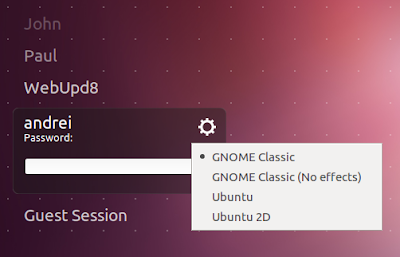
Note: The above picture doesnt belong to me. I just searched and found in googleimages.
So, select GNOME Classic or GNOME Classic (No Effects), and login.
4) After that start myunity. I used terminal to start it.

Change H Desktop to 4 and V Desktop to 0 as in the image above, it will make your workspace switcher look like good old one, all in a single row.
After this, I am loving this release even though it is a bit slow. Till now I was stuck with 10.04
I downloaded and intalled it. My first impression, I hated it... because it had unity as its default environment.. unity truly sucks.
I tried to install good old gnome.. but it was not possible now. So, I installed gnome-session-fallback to give it classic gnome look. Here are the steps:
1) Install gnome-session-fallback
sudo apt-get install gnome-session-fallback
2) Install myunity
sudo apt-get install myunity
3) Logout and choose gnome classic as your desktop environment. You can choose it .

Note: The above picture doesnt belong to me. I just searched and found in googleimages.
So, select GNOME Classic or GNOME Classic (No Effects), and login.
4) After that start myunity. I used terminal to start it.

Change H Desktop to 4 and V Desktop to 0 as in the image above, it will make your workspace switcher look like good old one, all in a single row.
After this, I am loving this release even though it is a bit slow. Till now I was stuck with 10.04
